



The good news is Claude Code is already a strong engineer. From the jump, it writes clean, working code; handles your language and framework; and takes care of the boilerplate without much help. The one thing it does not have yet is your context, the specifics of how your systems actually work. And that is the part you get to teach it.
Even better, teaching it is smaller and faster than most teams expect. You do not need a platform initiative or a big rollout to start. You can begin with a single file, add one reusable skill, and watch that same setup pay off on every project after it. Do it well and a new engineer can clone your repository and have Claude Code fluent in your codebase from their first day, no hand-holding required.
This guide walks through how to teach Claude Code your codebase so context stops living in people’s heads and starts living in the repo, where the whole team can use it. We’ll move from a single facts file to reusable custom skills, then package those skills into a plugin, and finally distribute the whole thing to your team through a private marketplace. By the end, you’ll know exactly how to create a Claude Code skill, how to structure a Claude Code plugin, and how to make sure a new joiner gets all of it the moment they clone the repository.
At DevCom, this is how our engineering teams give Claude Code the codebase understanding it needs on real client projects, so good context gets written down once and reused instead of re-typed every sprint.
Four Ways to Teach Claude Code Your Codebase
There are four levels of teaching Claude Code, and they build on each other.
Think of them as a progression from what the agent knows, to what it can do, to how you package that, to how everyone gets it.
01
CLAUDE.md
holds the facts Claude should always know about the repo: the stack, the folder layout, naming conventions, and code style.
02
Skills
hold the procedures Claude runs, and they load only when a task actually calls for them.
03
Plugins
bundle skills, docs, conventions, and scripts into one installable unit.
04
A marketplace
is the single catalog your whole team installs from.
The shorthand is *know, do, package, distribute.* Most of the real work sits in the middle two levels, and that’s where we’ll spend most of this article. But the two outer levels are what make the middle stick, so it’s worth understanding all four before you build anything.
CLAUDE.md vs Skills
The most common early mistake is stuffing everything into CLAUDE.md. It feels like the obvious place, and for a while, it works. The problem is cost.
The file rides along in context on every single turn. That is exactly what you want for a handful of stable facts, and exactly what you do not want for a long procedure you only run occasionally. A skill behaves the opposite way. Its short description sits in context, so Claude knows the skill exists; however, the body loads only when the skill is used. That means a long reference procedure is nearly free until the moment you need it.
Here’s how to decide where something belongs.
Put it there when it is a fact worth knowing every turn:
- Which frameworks and languages the project uses
- Where things live in the directory structure
- Naming and style conventions the team follows
Turn it into a skill when it’s a multi-step, repeatable piece of work:
- Onboarding a new country, carrier, or client environment
- Generating a report that follows a fixed sequence
- Any task where you keep re-explaining the same steps
A simple rule of thumb keeps this clean: when a section of CLAUDE.md turns into a numbered procedure, it wants to be a skill. The facts stay in the always-on file. The steps move somewhere they cost nothing until called.
How to Create a Claude Code Skill
The good news about how to create Claude Code skills is there’s barely anything to learn. A skill is just a folder with a SKILL.md file inside it, and the folder name becomes the skill’s identifier. That simplicity is the point. Once you understand the anatomy, most useful skills are shorter than you expect. The one that inspired this article was eighteen lines.
A real skill file looks like this:
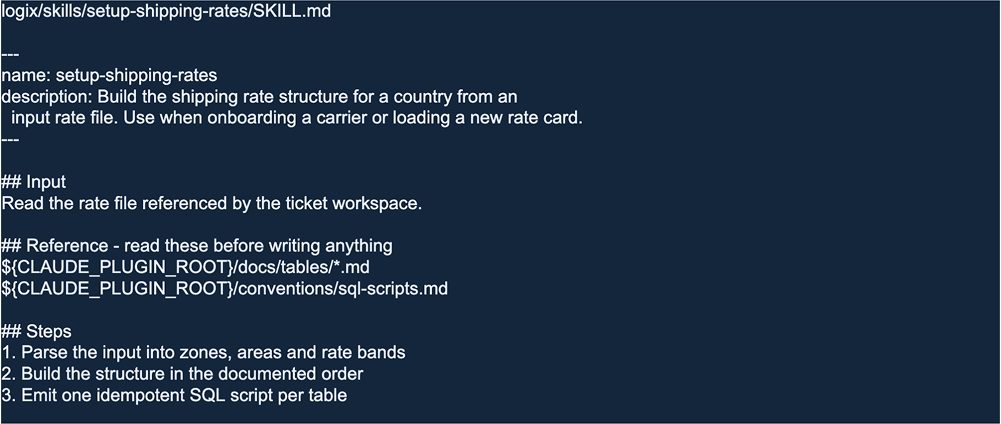
Three parts of that file carry all the weight.
1. The name matches the folder
The folder is setup-shipping-rates, and so is the name in the frontmatter. Claude Code will not load a skill whose folder and frontmatter disagree, so keep them identical. Use lowercase letters, numbers, and hyphens only.
2. The description is the trigger, not the topic
The description is the single most important line in the file because it’s the only text Claude sees before deciding whether to load the skill. Don’t just name the topic. Name the moment the skill should fire.
“Build the shipping rate structure for a country from an input rate file. Use when onboarding a carrier or loading a new rate card” tells Claude both what the skill does and when to reach for it. A vague description is a skill that never gets used. Anthropic’s own skill authoring best practices allow up to 1,024 characters here, which is more than enough once you focus the line on the trigger.
3. The body points at the docs instead of copying them
Notice what is missing from that skill: there are no table definitions and no column lists anywhere in it. Instead of pasting the schema, the skill points at docs/tables/ and tells Claude to read those files before writing anything. The specification lives in exactly one place. That’s what makes custom skills for Claude Code maintainable at scale, and it’s the difference between a skill you can trust and one that quietly goes stale.
The body itself is a simple shape you can reuse for almost any skill: input (what to read), reference (which docs to consult first), and steps (the procedure). Keep it lean. If a skill’s body starts sprawling, that’s a sign the detail belongs in a reference file the skill points to, not in the skill itself.
That same three-part shape is all you need to create custom skills for Claude Code across almost any repeatable task, from data cleanup to report generation to environment setup. Claude Code custom skills are just folders and plain prose, which is exactly why they are quick to write and easy to keep up to date.
How to Structure Context and Documentation for Claude Code
The reason skills stay short is the real detail lives in ordinary documentation. This is where teaching Claude Code your codebase starts paying off in ways you didn’t plan for.
A typical layout looks like this:

Those files aren’t configured. They’re plain prose, written the way you would write documentation for a colleague. That’s the whole trick: they earn their keep twice.

For the agent:
Skills point at these files instead of repeating them, so there is one source of truth and every SKILL.md stays short enough to actually read. Because a skill’s body only loads into context when the task actually calls for it, pointing at a long reference file costs nothing until the moment it’s read.

For humans:
The same markdown serves as your written documentation. A new joiner opens docs/tables/ and gets the answer instead of interrupting whoever wrote the schema.
Fix a table description once, and both audiences get the correction in the same edit. Writing documentation for the agent turns out to be the same activity as writing documentation for people. You were probably meant to write it anyway.
From Claude Code Skills to Plugins
One skill in one repo is useful. The friction shows up the moment you want to share a workflow with another team.
Without a plugin, sharing sounds like this: “Copy these five skill files, plus the conventions doc, plus the PowerShell script, and put them in the right folders.” Somebody misses a file, the workflow breaks, and you’re back to explaining things in person. A plugin turns all of that into a single install.
Here’s how to create a Claude Code plugin in practice: collect the related skills, docs, conventions, and scripts into one directory, then add a manifest that declares them. It’s a bundle, and the Claude Code plugin structure is just a directory with that manifest:

The plugin.json file is the manifest that declares what the plugin contains. A plugin can carry:
 Skills, one job each: shipping rates, warehouse users, ticket workspaces
- Orchestrators, multi-step workflows that chain skills together
- Docs and conventions, the shared reference every skill points at
- Scripts, the executable code your skills call directly
Plugins can also carry agents, hooks, and MCP servers. You may not need those on day one, and the shape of the plugin does not change when you eventually do. Start with the skills and docs you already have, and grow the bundle as the workflow grows.
Once you have a plugin, you need a way to hand it to everyone. That is what a marketplace is: your internal registry for Claude Code plugins. It gives you three things a shared folder never will:
 Discovery, one place people look for how your team works
- Version tracking, so you can pin a tag, a commit, or nothing at all
- Automatic updates, so a push to the repo reaches everyone who installed from it
The marketplace itself is a single file with three keys:
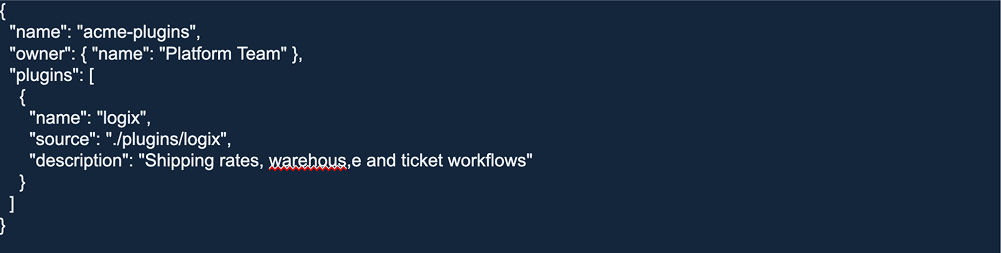
The name is the string everyone types after the @ when they install, so choose it deliberately. The source here is a relative path inside the same repo. This is the simplest option, but it’s not the only one. A plugin can also come from a GitHub repo, a subdirectory inside a monorepo, an npm package, a zip served over HTTPS, or a local command that prints the plugin directory. Pick whichever matches how your code is already organized.
Using the marketplace takes three commands and about 20 seconds:

Add the catalog, install the plugin, and run the skill. That third command is a procedure somebody else already wrote down, now running for you.
The last step is what makes it stick. Commit the marketplace and the enabled plugins to .claude/settings.json in the repo:
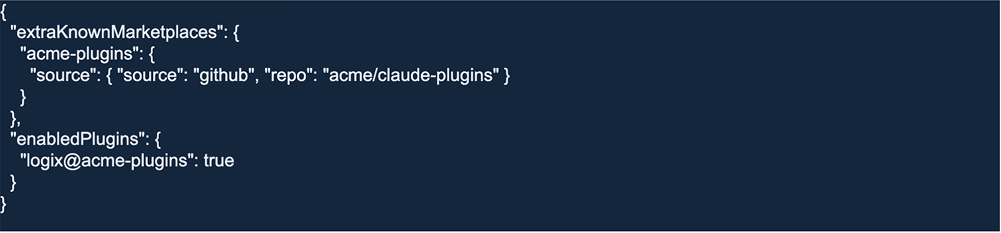
Now, a new joiner clones the repo, trusts the folder once, and has everything. No setup script. No onboarding wiki that went stale two quarters ago. And because the skills live beside the code, conventions change in the same pull request as the pattern they describe.
Common Mistakes When Building Claude Code Skills and Plugins
A handful of small things will bite you if you do not watch for them.
 A pinned version nobody bumps. Pin a plugin to an old tag and forget to update it, and half the team quietly runs a cached copy while the other half is current. Decide up front who owns version bumps.
- A trailing comma in the catalog. One stray comma in marketplace.json can take down the whole catalog. Put a JSON validator in CI so a broken manifest never reaches anyone.
- Mismatched names. The directory name, the plugin.json name, and the marketplace entry all have to agree. When they drift apart, the plugin silently fails to load.
- Forgetting to declare non-standard directories. The skills/ directory is scanned automatically. Other component directories, like custom orchestrators, load only because the manifest names them. Any new component folder needs an entry.
- Ignoring managed settings when security asks. When you need to lock the organization to an approved allowlist of plugins, managed settings are how you do it. Plan for that conversation before it arrives, not during an audit.
None of these is hard to avoid. They are just the kind of thing that costs an afternoon if you learn them the expensive way.
What a Team-Wide Claude Code Setup Looks Like
Put it all together, and the whole thing is smaller than you would guess. A mature setup is often one marketplace, one plugin, a handful of skills, a couple of orchestrators, and the docs that serve both the agent and the team:
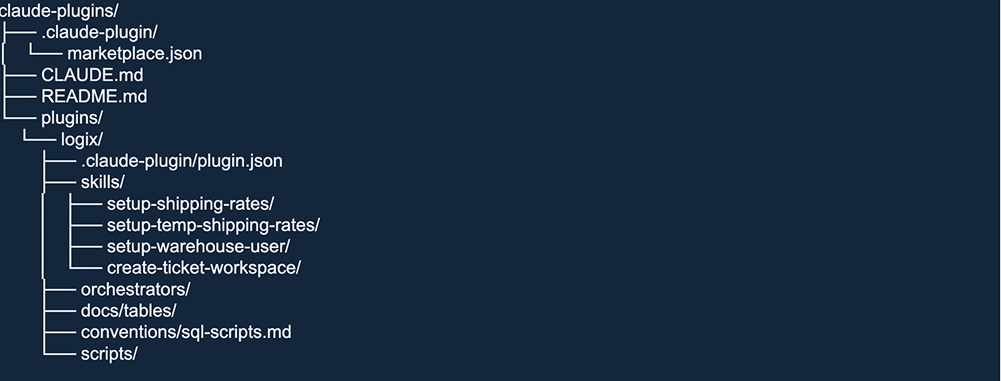
That’s the payoff of real Claude Code codebase understanding. The context that used to live in one senior engineer’s memory now lives in the repo: versioned, discoverable, and one install away for anyone who joins. If you want to see the pattern in the wild, Claude Code’s own open-source repository on GitHub ships its marketplace and plugins in exactly this shape.
If you want the official reference while you build, Anthropic documents the moving parts in the Claude Code skills guide and the plugin marketplaces guide.
Start With the Thing You Explained Twice
You don’t need a platform initiative to begin. You just need one procedure.
Pick the thing you explained twice this week, the workflow you keep pasting into Claude Code, and write it down as a skill before Friday. Eighteen lines were enough for the one that started all of this. Once it works, wrap it in a plugin. Once the plugin is useful, publish it to a marketplace. Each step is small, and each one takes a piece of tribal knowledge out of your head and puts it where the whole team can use it.
Building this into a real product or platform is exactly the kind of work our teams do every day. If you want a hand designing an AI-assisted engineering workflow around your own codebase, talk to DevCom about custom software development, and we’ll help you make Claude Code fluent in the way your systems actually work.



























.svg)